
Control Heat with Smart Fan Technology in Modern Laptops
Laptops today are faster, thinner, and more powerful than ever. But that power creates one constant challenge: heat. Understanding how Modern Laptops Control Heat helps users make better decisions, avoid costly repairs, and know when a cooling issue may require professional laptop repair in Las Vegas.
Modern devices no longer rely on simple fans that turn on and off. They use intelligent systems designed to protect performance, reduce noise, and extend hardware life. This guide explains how those systems work, why they matter, and what to do when heat control fails.
Table of Contents
Why Heat Control is a Core Challenge in Modern Laptops
Today’s laptops handle tasks that once required desktop machines. Video editing, gaming, multitasking, and heavy browser usage all generate heat.
Key reasons heat has become harder to manage:
- Compact internal layouts restrict airflow
- Faster CPUs and GPUs generate more thermal output
- Users expect silent operation and long battery life
Do you know: Sustained temperatures above 90°C can shorten processor lifespan by up to 30 percent. This is why Modern Laptops Control Heat using smarter, adaptive cooling instead of basic fans.
| Not Sure What’s Causing Your Laptop To Overheat?Contact our support team for clear guidance, honest diagnostics, and professional repair options tailored to your device.Contact Now |
How Heat Is Generated Inside a Laptop
The primary heat sources include:
- CPU processing cores
- Dedicated or integrated GPU
- Voltage regulators
- Storage drives under heavy read/write load
Compact designs leave little room for heat to escape naturally. Without active cooling, temperatures would rise quickly, triggering laptop shutting down due to heat to protect internal components.
Traditional Laptop Cooling and Why It Fell Short
Older laptops relied on simple cooling designs:
- Fixed-speed fans
- Basic heat sinks
- Passive heat dissipation
Why did those methods fail
- Fans ran at full speed even when unnecessary
- No awareness of workload intensity
- Loud operation with poor efficiency
As laptops became more powerful, these systems could not react fast enough. This limitation pushed the industry toward smarter solutions, changing how Modern Laptops Control Heat entirely.
Evolution of Laptop Cooling Technology
Older laptops used basic, fixed-speed fans. These fans turned on only after temperatures spiked and ran loudly regardless of workload.
Modern systems evolved because those designs caused:
- Constant noise
- Delayed cooling response
- Poor energy efficiency
Now, Modern Laptops Control Heat using adaptive systems that respond before damage occurs.
| Notice Excessive Heat Or Loud Fans? Professional laptop cooling repair services can clean airflow paths, replace failing fans, and restore proper thermal balance before permanent damage sets in. |
Core Elements That Make Smart Cooling Work
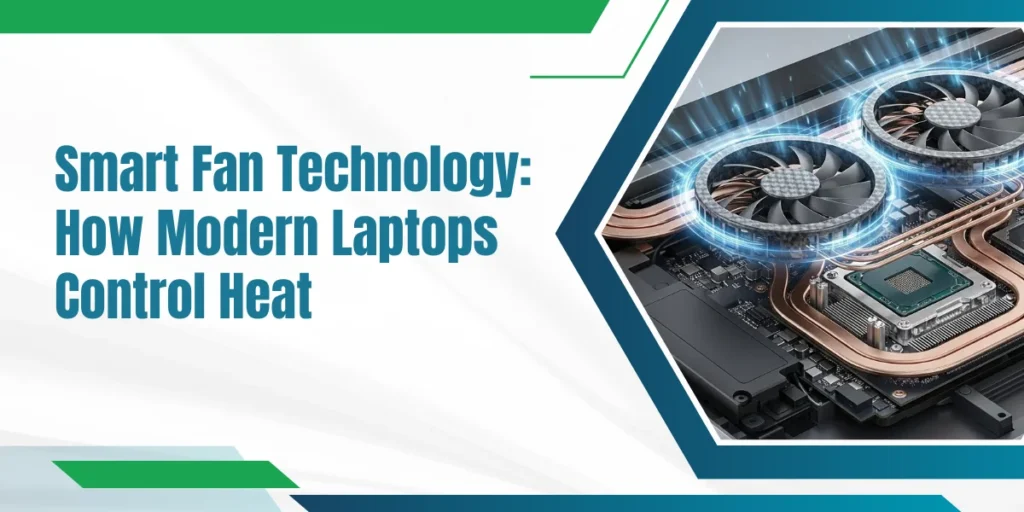
Smart laptop cooling uses sensors, fans, and heat-transfer components to keep devices safe and performing well.
1. Multi-Point Thermal Sensors
Modern laptops include several temperature sensors placed near:
- CPU and GPU dies
- Power circuits
- Memory modules
These sensors provide constant feedback, allowing precise fan control.
2. Embedded Fan Controllers
A dedicated controller processes sensor data independently of the operating system. This ensures cooling continues even during system crashes or boot cycles.
3. Advanced Heat Transfer Systems
Heat pipes and vapor chambers move heat efficiently toward exhaust vents. Vapor chambers can spread heat across a wider surface area, improving cooling under heavy load.
4. Precision Fan Design
Modern fan blades are engineered for airflow efficiency and reduced turbulence. Worn or damaged fans often lead to loud laptop fan repair needs.
Cooling Differences by Laptop Type
| Laptop Category | Cooling Priority | Common Problems |
| Ultrabooks | Quiet operation | Limited airflow |
| Gaming laptops | Maximum heat removal | Dust buildup |
| Business laptops | Stability | Sensor drift |
High-performance machines frequently require gaming laptop overheating repair due to sustained thermal stress.
Common Signs Smart Cooling Is Failing
Watch for these warning signs:
- Fans running at full speed during idle use
- Surface temperatures are becoming uncomfortable
- Sudden performance drops
- Repeated shutdowns
Users searching for a laptop overheating fix near me often ignore early symptoms until damage occurs. At Eastern Laptop Repair, we regularly see laptops that could have avoided costly repairs with earlier attention to cooling issues.
| Need Immediate Assistance? Call us today to book fast service for overheating, fan noise, or thermal shutdowns. Early repair prevents data loss and costly component replacement. |
The Role of Dust and Environmental Factors
Dust is one of the biggest enemies of cooling efficiency. Even a thin layer on fan blades or vents can reduce airflow by up to 40 percent.
This often leads to:
- Laptop fan replacement Las Vegas needs
- Reduced cooling efficiency
- Increased internal temperatures
Long-Term Damage Caused by Heat
Heat slowly weakens internal components. Prolonged exposure can cause:
- Cracked solder joints
- Battery swelling
- SSD data errors
In advanced cases, laptop heat damage repair may be required to restore system stability.
| Is Your Laptop Not Performing The Way It Should? Our technicians offer thorough diagnostics and professional laptop repairs to restore stability, performance, and reliability. |
Easy Ways to Keep Your Laptop Cool
Simple steps can prevent major failures:
- Have vents and fans cleaned every 3 to 6 months to eliminate dust and debris.
- Do not put laptops on soft materials that do not allow air to pass through.
- Maintain firmware, drivers, and BIOS that are well-thermalized.
- Check CPU and graphics card temperature when in use.
- Play games or do intensive work with the help of a cooling pad.
- Turn off any background applications that are unnecessary to generate heat.
- Take a rest with your laptop between long and intense performances.
- Store and keep your laptop in a cool and well-ventilated place.
- Check fans for unusual noise or vibration and replace if needed
These habits reduce the need for emergency laptop overheating repair Las Vegas visits.
Why Smart Cooling Extends Laptop Lifespan
Laptops operating within optimal thermal ranges can last 20–30 percent longer. Efficient cooling protects not only performance but also the internal structure.
This is why manufacturers invest heavily in how Modern Laptops Control Heat across different usage scenarios.
Overheating Laptop? Eastern Laptop Repair Can Help
At Eastern Laptop Repair, we deal with real-world cooling failures every day. From laptop cooling repair to complete fan replacement and thermal diagnostics, our focus is on restoring safe temperatures and long-term performance.
We regularly handle laptop overheating repair las vegas cases involving dust buildup, fan failure, and heat damage. Eastern Laptop Repair takes a thorough approach, fixing the cause, not just the symptom.
Eastern Laptop Repair – Your Go-To Provider for Laptop Cooling Repair in Las Vegas
We’re more than just another computer store in Las Vegas. We specialize in laptop cooling repair, offering fast, same-day services that fit your schedule. We know your time matters, and so does the health of your laptop.
1. Restoring Laptops and Peace of Mind Since 2001
We are not just another tech repair shop in Las Vegas. We specialize in laptop cooling repair, offering fast and reliable service on a same-day basis, which fits your schedule. We understand that you are time-conscious, and so is your laptop.
Eastern Laptop Repair is the company that has been able to provide reliable name of laptop cooling repairs, laptop overheating, and complete laptop maintenance in Las Vegas for more than 20 years. Quick, efficient, and low-cost repair and maintenance of your laptop.
2. Post-Repair Support You Can Count On
Worried about problems after a repair? Our team provides post-repair support to ensure your laptop stays cool, stable, and running smoothly.
3. Affordable Repairs Without Compromise
High-quality laptop thermal issue repair doesn’t have to cost a fortune. We deliver efficient fan replacements, cooling system repairs, and component fixes at prices that fit your budget.
4. Certified Technicians Restoring Performance
Our experienced technicians diagnose and repair laptop heat problems with precision, from overheating fans to internal thermal issues. Trust us to handle laptop cooling repair with 100% accuracy.
5. Customer Satisfaction is Our Priority
Every repair comes with a 30-day warranty. We use only genuine parts, never substitutes, to ensure your laptop stays protected against future overheating and thermal problems.
6. Fast, On-Time Service You Can Rely On
Need urgent repair? We provide emergency services in Las Vegas, getting your device back to you quickly while maintaining top performance.
Final Thoughts
Smart fan technology has transformed how Modern Laptops Control Heat. By combining sensors, intelligent control, and efficient heat transfer, modern systems deliver better performance, lower noise, and longer hardware life.
When cooling fails, timely laptop cooling repair and expert service from Eastern Laptop Repair can save both your device and your data.