
Data theft during device repair is a real concern for anyone handing over a smartphone, laptop, or tablet for servicing. While most technicians follow ethical practices, your device still contains highly sensitive data that can be exposed if proper precautions are not taken.
Modern devices store everything from banking apps and passwords to private photos and business files. According to IBM’s Data Breach Report, the global average cost of a data breach has reached millions of dollars annually, showing how valuable digital information has become.
In most cases, repairs are safe, but understanding where risks exist helps you prevent unnecessary exposure.
Can Repair Technicians Access the Data Stored on Your Device?
In most cases, technicians do not need to access your personal files to perform hardware repairs. However, access can happen depending on the issue.
For example:
- Screen or battery replacements usually do not require file access.
- Software repairs or system diagnostics may require unlocking the device.
- Data recovery services often require full access to storage.
This is where concerns about repair shop data security become relevant. Even if access is unintentional, an unlocked device can expose sensitive data such as photos, messages, or saved credentials.
What Types of Personal Information Are Most at Risk?
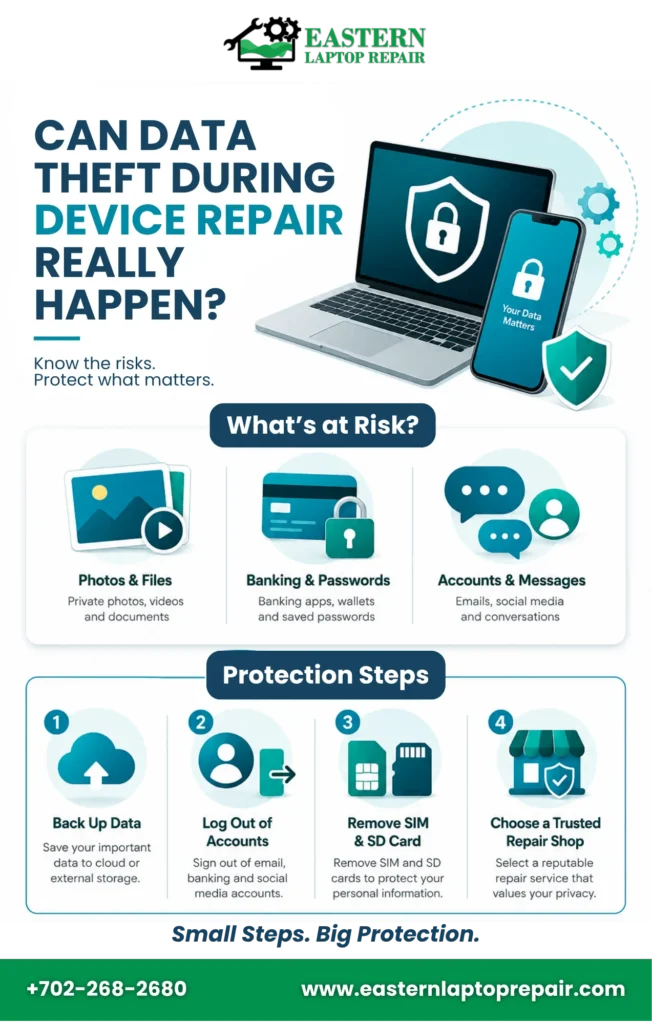
Devices today store far more than just basic files. The most sensitive data includes:
- Photos and private videos
- Banking apps and payment wallets
- Email accounts and login credentials
- Business documents and client records
- Social media conversations
If proper precautions are not taken, personal data protection becomes difficult once the device is handed over to a third party.
Safe vs Risky Repair Scenarios
| Repair Scenario | Data Access Required | Risk Level | Recommendation |
| Screen replacement | No | Low | Lock the device before submission |
| Battery replacement | No | Low | Remove SIM & SD card |
| Software troubleshooting | Yes | Medium | Backup + logout accounts |
| Data recovery service | Full access | High | Encrypt or supervise the process |
| Unverified repair shop | Unknown | High | Avoid or reset the device |
What Are the Real Risks of Data Theft During Repair?
While most repair professionals are trustworthy, risks still exist due to human error, weak policies, or malicious intent.
The most common risks include:
- Unauthorized browsing of files
- Copying of personal data to external drives
- Installation of spyware or tracking tools
- Account access through saved logins
- Data leakage in shared workshop environments
Cybersecurity research from Verizon’s Data Breach Investigations Report highlights that human access remains one of the weakest security points in data protection systems.
Even a single unlocked device can expose a large amount of personal information.
Is It Safe to Give Your Phone or Laptop for Repair?
Yes, but only when proper precautions are taken.
Safety depends on:
- Reputation of the repair center
- Whether they follow privacy protocols
- Whether devices are handled in secure environments
- Whether technicians are certified or trained
Choosing a trusted service provider significantly reduces the chances of data theft during device repair.
However, trust alone is not enough. User-level precautions are equally important.
EasternLaptopRepair – 20+ Years of Trusted Experience in Safe Device Repair
If you’re planning to get your device repaired and worried about your personal data, choosing the right service provider makes all the difference. At EasternLaptopRepair, repairs are handled by A+ certified technicians with over 20 years of hands-on experience in diagnosing and fixing a wide range of devices.
Alongside technical expertise, special attention is given to customer privacy and data safety throughout the repair process. Your files, accounts, and personal information are treated with care and strict confidentiality, so you don’t have to carry unnecessary stress while your device is being serviced.
| If your device needs careful handling, consider using a professional device repair service that prioritizes both hardware quality and data privacy protection during repairs. Book a Device Repair Now |
How to Protect Your Data Before Repair
Before handing over your device, take a few minutes to secure your data. This step alone can eliminate most risks.
Key actions include:
- Back up your data to the cloud or external storage
- Log out of email, banking, and social media accounts
- Enable device encryption if not already active
- Remove saved passwords from browsers
- Delete sensitive files if they are not needed
- Remove SIM and SD cards
A simple habit of computer data safety practices ensures that even if access occurs, your private information remains protected.
You can think of this step as creating a safety buffer between your personal life and the repair process.
Should You Factory Reset Before Repair?
A factory reset is one of the most effective ways to protect data, but it is not always necessary.
It works best when:
- You are handing the device to an unfamiliar technician
- The repair is software-related
- You do not need data recovery
However, avoid resetting when:
- You need your data restored after the repair
- The technician must diagnose stored system issues
While a reset minimizes exposure, it can slow down troubleshooting. The decision depends on your repair situation and comfort level with risk.
What Warning Signs Should You Watch After Repair?
Once you receive your device back, pay attention to unusual behavior such as:
- Unknown apps installed
- Changed security settings
- Password reset notifications you did not request
- Increased battery or data usage
- Strange background activity
These signs may indicate possible exposure or misuse, which relates again to laptop repair data safety concerns.
Early detection helps prevent further damage.

What to Do If You Suspect Data Theft
If something feels off after a repair, act quickly:
- Change all passwords immediately
- Enable two-factor authentication
- Check login history across accounts
- Run a trusted antivirus scan
- Contact your bank if financial apps were affected
- Report the issue to the repair provider
Fast action can significantly reduce the impact of potential data theft during device repair incidents.
| You can contact a certified technician or support team immediately to review your device and secure your accounts before further damage occurs. Contact Now |
How Professional Repair Shops Protect Your Data
Reputable repair services usually follow structured security practices such as:
- Restricted access to devices
- Customer approval before unlocking
- Secure diagnostic systems
- Employee privacy training
- Controlled repair environments
These steps are part of modern repair shop data security standards designed to reduce risk at every stage of the process.
Final Thoughts
Data theft during device repair is not a common everyday issue, but it is a realistic risk if devices are not properly secured before servicing. The good news is that most risks can be avoided with simple precautions like backing up data, logging out of accounts, and choosing trusted repair providers.
Being proactive matters more than assuming safety. A few minutes of preparation can protect your entire digital identity.
Frequently Asked Questions
Can repair technicians access my photos?
Yes, technicians can access photos if the device is unlocked or system access is required.
Can someone copy my data without me knowing?
Yes, data can be copied without notice if proper security measures are not enforced.
Should I remove SD cards before repair?
Yes, always remove SD cards to protect your personal files and externally stored data.
Is it safe to leave a SIM card inside?
It is safer to remove the SIM card unless it is needed for diagnostic testing purposes.
Can data be recovered after a factory reset?
Yes, in some cases, data can still be recovered if it was not securely overwritten.