
Choosing the right computer repair service can save you money, protect your personal data, and extend the life of your devices. Unfortunately, many consumers end up dealing with overpriced repairs, low-quality parts, or dishonest technicians simply because they do not know what warning signs to watch for.
This guide explains how to carefully evaluate repair providers, avoid common scams, and make informed decisions before handing over your laptop, desktop, or phone.
Why Repair Scams Are More Common Today
The demand for electronics repairs has grown rapidly over the last few years. According to data from Statista, the consumer electronics market continues to expand as people increasingly rely on smartphones, laptops, tablets, and gaming systems for work and everyday life.
As demand increases, so do dishonest repair businesses trying to take advantage of customers who may not understand technical repairs. Some shops advertise unrealistically low prices only to add hidden fees later. Others use poor-quality replacement parts that fail within weeks.
A reliable computer repair service should always prioritize transparency, clear communication, and long-term customer trust rather than quick profits.
| Need Fast and Reliable Computer Repairs?Get expert diagnostics and dependable fixes from trained technicians who handle your device with care and precision. Don’t wait until the problem gets worse. Repair your computer now |
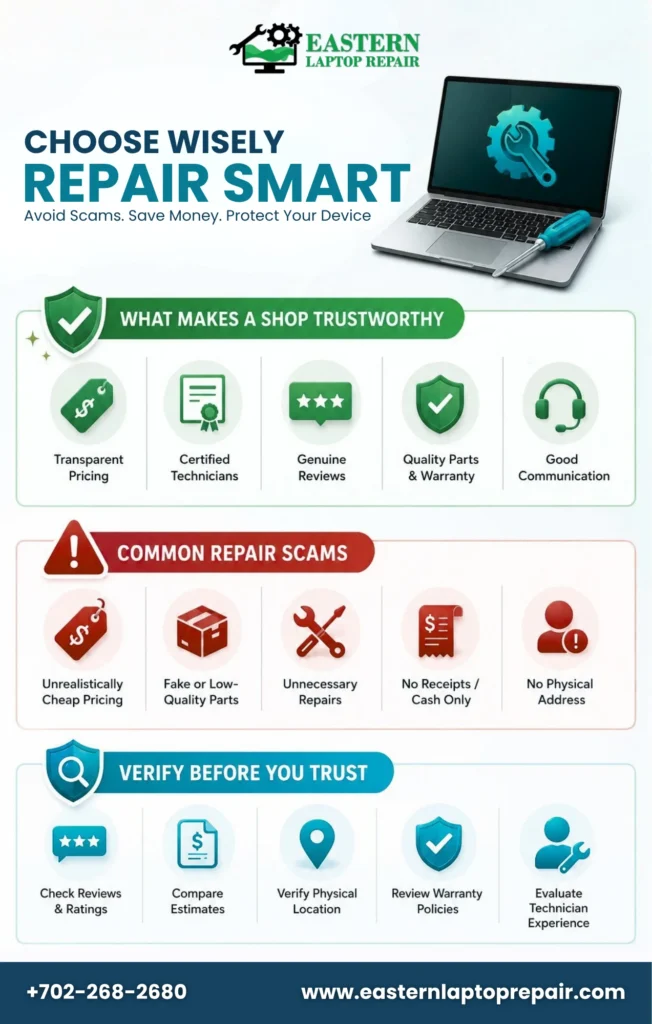
What Makes a Repair Shop Trustworthy?
Not every repair provider operates the same way. Before choosing a technician, look for a few important qualities that separate legitimate businesses from risky ones.
1. Transparent Pricing
One of the biggest warning signs is vague pricing. Professional repair companies usually provide:
- Written estimates
- Diagnostic explanations
- Labor cost breakdowns
- Clear warranty information
If a technician avoids giving a quote or pressures you to approve repairs immediately, consider it a red flag.
| Need a Trusted Computer Repair Shop?Visit a reliable computer repair shop for fast diagnostics, honest pricing, and expert technicians who can fix your device properly the first time. Visit Our Computer Repair Shop Today |
2. Verified Experience and Certifications
Consumers often overlook technical credentials, but they matter. Experienced technicians are more likely to diagnose problems correctly and avoid unnecessary repairs.
Look for:
- Industry certifications
- Authorized repair partnerships
- Years of experience
- Specialized expertise for your device brand
This is especially important when searching for a trustworthy repair shop that handles expensive electronics.
3. Genuine Customer Reviews
Online reviews can reveal patterns that advertisements never show. Check multiple review platforms and focus on recurring comments about:
- Pricing honesty
- Repair quality
- Communication
- Turnaround time
Be cautious if reviews sound overly generic or appear suspiciously repetitive.
Common Repair Scams Consumers Should Avoid
Understanding how repair scams work can help you avoid expensive mistakes.
Unrealistically Cheap Pricing
Low prices attract attention, but they can also signal poor workmanship or low-quality components. Some shops advertise a low repair fee and later claim additional damage was discovered.
In many cases, consumers end up paying more than they would have at a reputable provider.
Fake Replacement Parts
Not all replacement parts are equal. Inferior screens, batteries, and charging ports may fail quickly or damage the device further.
Ask whether the shop uses:
- OEM parts
- High-grade aftermarket components
- Warranty-backed replacements
This is particularly important for phone and laptop repair services where component quality directly affects performance.
Unnecessary Repairs
Some dishonest businesses exaggerate problems to increase repair bills. For example, a simple battery issue may be presented as a motherboard failure.
Before approving expensive repairs:
- Request a written diagnosis
- Ask for damaged parts to be returned
- Compare estimates from multiple providers
How to Verify a Repair Provider Before Hiring
Doing a little research beforehand can help you avoid frustration later.
| What to Check | Why It Matters |
| Business reviews | Reveals customer experiences |
| Warranty policies | Protects against repeat failures |
| Physical location | Confirms legitimacy |
| Repair estimates | Helps compare pricing |
| Technician experience | Reduces repair risks |
According to research from the Pew Research Center, consumers increasingly rely on online reviews before making service-related decisions. That makes reputation one of the strongest trust indicators today.
Visit the Shop If Possible
A legitimate repair business usually maintains:
- Organized workspaces
- Proper diagnostic equipment
- Professional customer support
- Clear business policies
An unprofessional environment often reflects poor repair standards.
Questions You Should Ask Before Approving Repairs
Many consumers skip this step and regret it later. Asking the right questions helps prevent misunderstandings and surprise charges.
Important Questions to Ask
- What type of replacement parts do you use?
- Is there a warranty included?
- How long will repairs take?
- Will I receive a written estimate?
- Can my data remain protected during repairs?
These questions are especially useful when evaluating repair shop reviews and comparing local providers.
Protecting Your Personal Data During Repairs
Data privacy is one of the most overlooked risks in electronics repair. Devices often contain:
- Banking information
- Saved passwords
- Private photos
- Business documents
Before leaving your device with any technician:
- Back up important files
- Remove sensitive information if possible
- Enable password protection
- Log out of financial accounts
A professional computer repair service should explain how customer data is handled and protected throughout the repair process.

Signs You May Be Dealing With a Scam
Certain warning signs appear repeatedly in fraudulent repair situations.
Major Red Flags
- No physical business address
- Refusal to provide written estimates
- Pressure to approve repairs quickly
- Cash-only payments without receipts
- Extremely low pricing compared to competitors
Consumers searching for the best repair shop near me should pay close attention to these indicators before making a decision.
Why Quality Repairs Save Money Long-Term
Many people focus only on immediate repair costs, but cheaper fixes often lead to repeated problems.
A quality repair may cost slightly more upfront, but it usually provides:
- Better durability
- Improved device performance
- Lower long-term expenses
- Reduced risk of data loss
According to industry reports from Gartner, consumers are holding onto electronics longer due to rising replacement costs. That makes reliable repairs increasingly valuable.
Helpful Tip Before Choosing a Repair Provider
If you are unsure about device issues, start with diagnostics before committing to major repairs. Many businesses now offer inspection-based computer repair services that help customers understand the exact problem before paying for full repairs.
This approach reduces unnecessary expenses and gives you a chance to compare recommendations from different technicians.
| Have Questions or Need Help?Reach out today for quick support, repair guidance, or service booking. Our team is ready to assist you with clear answers and a fast response. Contact Us Now |
Final Thoughts
Finding a dependable computer repair service does not have to feel risky. By checking reviews, comparing estimates, verifying warranties, and asking the right questions, consumers can avoid common scams and make smarter repair decisions.
A trustworthy repair provider should always communicate clearly, explain repairs honestly, and prioritize long-term customer satisfaction over quick sales. Taking a few extra minutes to research before approving repairs can protect both your device and your wallet.
FAQs
1. How do I know if a repair shop is trustworthy?
Check reviews, warranties, certifications, transparent pricing, and consistent customer experiences before approving repairs.
2. Why are some repair services extremely cheap?
Cheap repairs often use low-quality parts, inexperienced technicians, or hidden fees after diagnostics are completed.
3. Should I back up my device before repairs?
Yes, backing up protects important files, passwords, photos, and sensitive personal information from accidental data loss.
4. Are warranties important for repair services?
Repair warranties protect customers against defective parts, repeat failures, and poor workmanship after completed repairs.
5. What questions should I ask repair technicians?
Ask about pricing, warranties, repair timelines, replacement parts quality, and technician experience before approving repairs.