
Your laptop battery isn’t lasting like it used to. Maybe it drains within an hour, or your system suddenly shuts down even when there’s charge left. These are clear signs of battery wear, and at this point, most users start considering laptop battery replacement, repair options, or quick fixes.
The problem is, there’s a lot of misleading advice out there. Some suggest repair tools, others recommend software fixes, and a few push risky solutions. So what actually works?
This guide breaks it down in a practical, honest way so you can decide whether to replace the laptop battery, optimise it, or move on.
| Extend your device’s life with a safe and reliable laptop battery replacement. Get a compatible battery installed and restore your laptop’s performance. Get Battery Replacement |
Understanding the Reality of Laptop Battery “Repair”
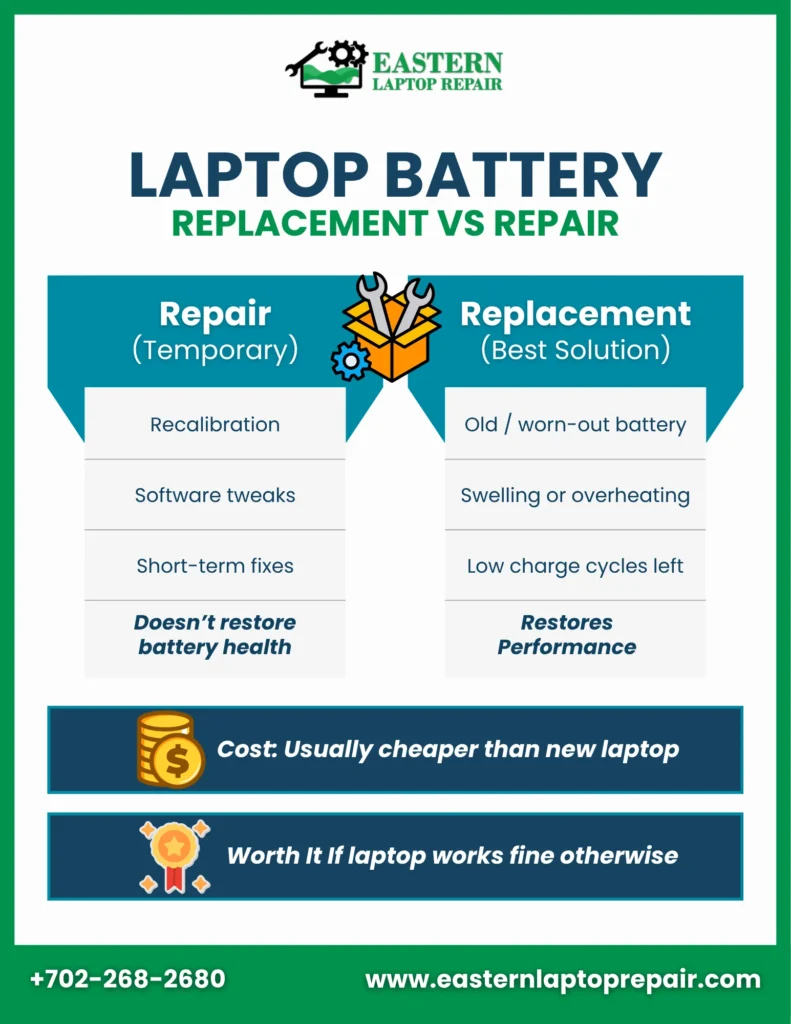
Let’s be clear from the start: a true laptop battery repair service doesn’t restore battery health once it’s degraded. Laptop batteries are made of lithium-ion cells, and these cells naturally lose capacity over time due to chemical aging.
What people call “repair” usually includes:
Recalibration
This process involves charging the battery to 100% and then draining it completely before charging again. It helps the system display more accurate battery percentages, especially if readings seem inconsistent. However, it does not improve battery life or restore lost capacity in any way.
Cell replacement
Some technicians attempt to open the battery pack and replace internal cells. While technically possible, this is not recommended. The battery’s internal circuitry is calibrated for specific cells, and mismatched replacements can lead to overheating, reduced performance, or even safety risks like fire hazards.
Software-based laptop charge fix
Adjusting power settings, updating drivers, or closing background apps can improve how efficiently your laptop uses power. This can slightly extend usage time, but it does not fix the actual battery degradation.
👉 In simple terms, these methods manage symptoms. They don’t solve the root problem.
When Laptop Battery Replacement Is the Right Solution
A proper laptop battery replacement is the only reliable way to restore battery performance once it starts failing. The key is knowing when replacement actually makes sense.
Replace your battery if:
- It has exceeded its charge cycle lifespan
Most lithium-ion batteries are designed for around 300 to 500 full charge cycles. According to Battery University, once you cross this limit, battery capacity can drop significantly, often below 80% of its original performance.
- You notice physical warning signs
If your battery is swelling, bulging, or causing the laptop casing to lift, it needs immediate replacement. This is not just a performance issue but a safety concern that can damage internal components.
- The laptop is otherwise healthy
If your processor, RAM, and storage still meet your needs, investing in a laptop battery replacement is far more cost-effective than buying a new device.
- You can find a reliable replacement battery
Availability of OEM or high-quality third-party batteries makes replacement straightforward and safe.
👉 If you’re wondering if a laptop battery is worth replacing, the answer is yes in most cases where the device itself is still functional.
Laptop Battery Replacement Cost: A Practical Breakdown
Understanding the laptop battery replacement cost helps you make a more informed decision rather than guessing.
- Battery price: $60 to $150, depending on model
- Professional installation: $50 to $100
- Total cost: Typically under $250
| At Eastern Laptop Repair, we offer affordable laptop battery replacement in Las Vegas using high-quality original parts. Our reliable service and consistent results have earned the trust of many satisfied, returning customers. |
Now compare that with:
- A new laptop costing anywhere from $400 to $1000+
- Time spent reinstalling software and transferring files
- Potential compatibility issues with new systems
According to the U.S. Environmental Protection Agency (EPA), extending the life of electronic devices reduces e-waste and environmental impact. So choosing a laptop battery replacement is not just cost-effective, but also more sustainable.
👉 A simple rule: if replacement costs less than 25% of a new laptop, it’s usually worth it.
DIY vs Professional Laptop Battery Replacement
Not all laptops are built the same, and how easy it is to replace a laptop battery depends on the design.
User-replaceable batteries
These are typically found in older or business-focused laptops. They can be removed using a latch or panel, making replacement quick and safe without any technical skills.
Internal batteries
Modern laptops usually have sealed designs where the battery is inside the device. Replacing these requires opening the laptop, disconnecting delicate cables, and sometimes dealing with adhesive.
This introduces risks like:
- Damaging internal components
- Voiding warranties
- Improper installation
👉 For internal batteries, professional laptop battery replacement is usually the safer and more reliable choice.
| Need expert help? Call now and get your laptop battery replacement handled safely by professionals. Call us |
Third-Party Batteries: What You Need to Know
Third-party batteries are often marketed as cheaper alternatives, but not all are reliable. While some brands offer good quality, others may overstate capacity or lack proper safety standards.
If you choose a third-party option:
- Go with trusted brands only
- Check reviews for your specific laptop model
- Ensure return and warranty options are available
- Look for certifications like UL or CE
A low-quality battery can lead to overheating, reduced lifespan, or even hardware damage. In many cases, a slightly more expensive, reliable option is the better investment.
Battery Optimisation: What Actually Helps
If your battery isn’t completely dead yet, optimisation can help extend its remaining life.
Effective practices
- Keeping charge levels between 20% and 80% reduces stress on battery cells
- Avoiding high temperatures prevents faster chemical degradation
- Using power-saving modes reduces unnecessary energy usage
- Keeping software and drivers updated ensures efficient power management
What doesn’t work:
- Freezing the battery
- Using “battery repair” apps
- Installing random optimisation tools
👉 These myths don’t restore battery health. They only create false expectations.
| Not sure if you need a laptop battery replacement? Book a free diagnostic and get a clear answer before spending money.Get a Free Diagnostic |
Easy Tips to Extend Laptop Battery Performance
- Keep battery charge between twenty and eighty percent
- Avoid exposing the laptop to high temperatures
- Reduce screen brightness to save battery power
- Close unnecessary background apps draining battery life
- Use power-saving mode for daily tasks
- Turn off WiFi and Bluetooth when unused
- Update system software and drivers regularly
- Avoid keeping the laptop plugged in constantly
Making the Right Decision
Choosing between repair, replacement, or upgrading comes down to your laptop’s overall condition.
Go for laptop battery replacement if:
- Your laptop is under 5 years old
- The battery is the only major issue
- Replacement cost is reasonable
Consider upgrading if:
- Your laptop is outdated
- Performance is slow beyond battery issues
- Multiple components are failing
Try optimisation if:
- The battery still gives a few hours of use
- The issue is minor or recent
👉 This approach helps you confidently decide whether to replace the laptop battery or invest elsewhere.
| Still unsure what to do? Contact us for honest advice and the best solution for your device. Contact us |
Conclusion
There’s no shortcut when it comes to battery health. Once it degrades, it cannot be repaired in the traditional sense. The only reliable solution is a proper laptop battery replacement.
For most users, especially with laptops under 4–5 years old, replacing the battery is a smart investment. It restores usability, saves money, and avoids unnecessary upgrades.
Skip the myths, avoid risky fixes, and focus on what actually works.

FAQs
1. Is the laptop battery worth replacing?
Yes, if your laptop is still performing well and the battery is the main issue, replacement is a cost-effective solution.
2. Can a laptop battery repair service fix my battery permanently?
No, most services only offer temporary solutions or replacements. True repair isn’t possible once cells degrade.
3. What is the average laptop battery replacement cost?
The cost of a laptop battery replacement depends on factors like your device model, battery type, and whether installation is required. In most cases, it’s an affordable solution compared to replacing the entire laptop.
4. How do I know when to replace the laptop battery?
Signs include fast draining, overheating, sudden shutdowns, and physical swelling.
5. Can a laptop charge fix improve battery life?
It can improve efficiency, but won’t restore lost battery capacity.