
If your phone suddenly stops charging properly, debris inside the port may be the cause. Learning how to clean phone charging port safely can restore charging performance and prevent long-term damage.
Dust, pocket lint, and tiny particles easily collect inside the port, especially when phones are stored in bags or pockets. A clogged port can prevent your charging cable from connecting correctly.
When this happens, you may notice loose cables, slow charging, or a device that won’t charge at all. In many cases, simply cleaning the port can solve the issue.
| Need Professional Phone Repair? If cleaning the port doesn’t fix the problem, your device may need expert attention. Our technicians can quickly diagnose charging issues and provide reliable repairs to get your phone working again. Get your phone repaired |
Why You Should Clean Your Charging Port
Even though the port opening is small, it collects debris quickly. Each time you insert a charging cable, dust can be pushed deeper inside. Over time, this buildup can cause poor electrical contact.
Common signs your device needs a clean phone charging port procedure include:
- The charging cable feels loose
- Phone charges only when the cable is angled
- Slow or inconsistent charging
- Charging completely stops
If you notice these signs, debris may be preventing a solid connection between the cable and the internal pins.
| Need Expert Help? If your phone still won’t charge properly, a deeper issue could be affecting the port. Get a Free Diagnostic Check |
How to Inspect Your Charging Port
Before cleaning, check the port carefully.
- Turn off your device.
- Use a bright flashlight or lamp.
- Look inside the port for lint, dust, or dirt buildup.
Many people discover that the port is completely packed with lint from pockets or bags. If you notice debris, it’s time to clean the phone charging port safely.
Tools You Can Use to Clean a Charging Port
Using the right tools is essential to prevent damage.
Safe tools include:
- Wooden toothpick or plastic pick – gentle for removing lint
- Cotton swab – useful for delicate cleaning
- Compressed air – helps blow out loose dust particles
These tools allow you to remove lint from the phone charging port without damaging sensitive connectors.
Tools You Should Never Use
Avoid these items when cleaning your phone:
- Metal pins or needles
- Paper clips
- Knives or sharp objects
- Blowing air from your mouth
Metal tools can scratch connectors, while moisture from breath can damage internal components.
| Phone Charging Issues? If debris removal does not solve the problem, your device may require charging port repair. Book Phone Charging Port Repair Today |
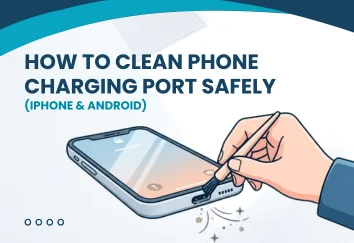
How to Clean iPhone Charging Port
If you’re wondering how to clean iPhone charging port, follow these safe steps.
- Turn off the device completely.
- Hold compressed air upright and spray short bursts into the port.
- Check the port again with a light.
- Use a wooden toothpick to gently remove any remaining lint.
- Blow compressed air again to clear loose debris.
After cleaning, power the device back on and test charging.
In most cases, a properly clean phone charging port restores the connection immediately.
How to Clean Android Charging Port
The process for how to clean Android charging port devices like Samsung Galaxy or Google Pixel is very similar.
- Turn off the phone.
- Use compressed air to loosen dust.
- Gently remove lint using a toothpick or soft pick.
- Blow air again to clear the port.
- Turn the device back on and test charging.
This simple process helps clean phone charging port buildup that often blocks USB-C connectors.
Get Fast Phone Repair — Call Now
How to Remove Water from a Charging Port
Moisture inside the port can also cause charging failure.
Follow these steps:
- Turn off the phone immediately.
- Place the phone in a dry, ventilated area.
- Keep the charging port facing downward.
- Allow the device to dry for at least one hour.
Avoid putting your phone in rice. Rice particles can get stuck inside the port and make the situation worse.
When Cleaning Doesn’t Fix the Problem
Sometimes, debris is not the main issue. If cleaning doesn’t work, your phone may have:
- A damaged charging connector
- Internal corrosion
- Battery issues
- Hardware failure
In these situations, professional repair is usually required rather than attempting to clean phone charging port again.

8 Pro Tips to Protect Your Phone Charging Port
- Store your phone away from lint-filled pockets regularly
- Always use high-quality certified charging cables only
- Avoid charging your phone in dusty environments
- Inspect the charging port every few weeks
- Keep your phone completely dry at all times
- Remove the charging cable slowly and carefully
- Use a protective case with a port cover
- Clean your phone and port periodically for maintenance
Final Thoughts
Keeping your charging port clean helps your phone charge properly and last longer. Dust and lint buildup is one of the most common reasons phones stop charging, and a careful clean phone charging port process can often solve the problem in minutes.
However, if your device still shows charging issues after cleaning, the safest option is professional repair. Experts can identify hidden problems and restore your phone’s performance quickly.
FAQs
1. Can a dirty charging port damage my phone?
Yes. Dust and lint can block the connection between the cable and the port, causing overheating or long-term charging issues if ignored.
2. How often should you clean your phone’s charging port?
Most people should clean it every 2–3 months, especially if they keep their phone in pockets or bags where lint can build up quickly.
3. Can a wireless charger work if the charging port is clogged
Yes. Wireless charging does not rely on the port, so it may still work even if debris is blocking the cable connection.
4. Why does my phone charge only when the cable is held at an angle?
This usually means debris is preventing the cable from connecting properly, or the charging port may be slightly damaged.
5. How do I prevent lint from building up in my charging port?
Using a phone case with a port cover and avoiding dusty pockets or bags can help reduce lint buildup.